In your control panel, go to Storefront > My Themes OR Channel Manager > Edit Storefront Settings > Themes (depending on your plan with BigCommerce), and click the blue "Customize" button to launch Theme Editor.
In the left-hand column of the Theme Editor, click the panel labeled 'Global'.
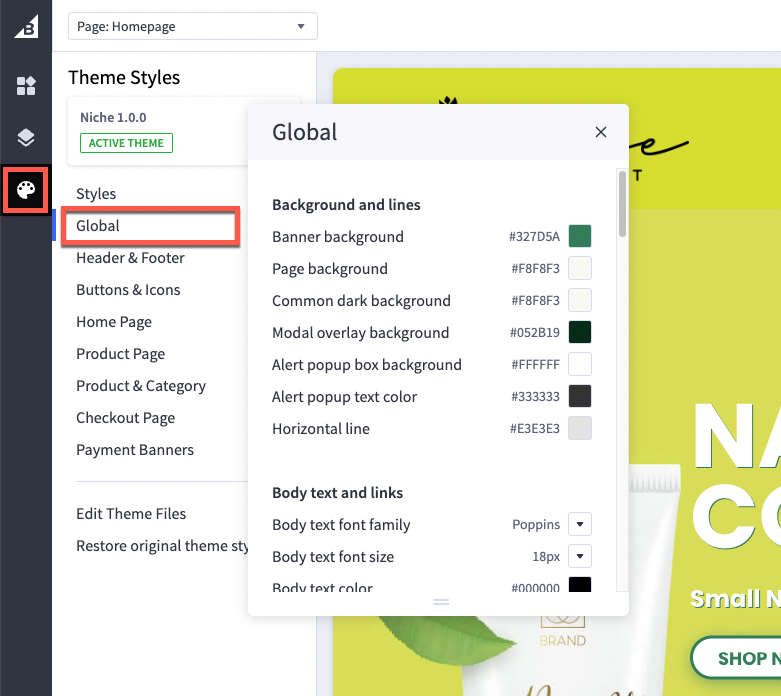
Background and Lines
| Banner bakground | Changes the background of the banner (behind the image) |
| Page background | Changes the background color of the overall site pages. It does not change the color of the header or footer backgrounds |
| Primary lineC | Changes the color of lines that divide header, footer and product description |
| Common dark background | The color of the overlay when using quick view |
| Modal overlay background | Changes the background color of modal windows or popups such as the quick view box background or add to cart background |
| Alert popup box background color | Changes the color of popup messages and alerts |
| Horizontal lines | Color of lines that divide header, footer and product description |
Body Text and links
| Body text font family | font face to use for body text |
| Body text font size | font size to use for body text |
| Body text color | color of the filled portion of the spinner |
| Body text hover color | affects the color of text, such as Logo Text, when you hover a cursor over it |
| Secondary text color | changes the color of text used as subtitles, such as the links in the footer, the price of the product on the home page, and category breadcrumbs |
| Secondary text hover color | affects the color of text such as the text in the footer when a cursor hovers over it |
| Link color | hyperlinks created on webpages will have this color |
| Link hover color | the color displayed when a cursor hovers over a link |
| Link active color | the color that displays when a user clicks a link. This may display quickly and may not appear at all on some browsers. |
Headings
| Page Heading font family | Select the font face to use for all headings |
| Heading text color | Sets the heading text colour on categories and internal pages |
| Heading background color | Sets the background behind the heading on categories and internal pages |
Loading indicators
| Page loading bar | color of the loading bar |
| Spinner light half | color of the empty portion of the spinner |
| Spinner dark half | color of the filled portion of the spinner |
| Modal loading background | color of the loading overlay |
| Product thumbnail loading background | color that appears while a thumbnail image loads |
Image Loading
| Lazyloading mode |
Sets how images should load into the page. Lazyload = Delay loading of images until they are in viewport (fastest) Lazyloading with LQIP (Low Quality Image Preview) = Delay loading of images until they are in viewport but display a low quality preview image until loaded (fast) Disabled = Turn off Lazyloading (slowest) |
Pages
| Hide Breadcrumbs | Hide the breadcrumb links at top of pages eg "Home > Shop > Category > Product name" |
| Hide page heading | Hide page headings on web pages |
| Hide category page heading | Hide page headings on categories |
| Hide blog page heading | Hide page headings on blog |
| Hide contact us page heading | Hide page heading on contact us page |
Products
| Display style |
On category pages, show products in a grid or a list style layout |
Blog
| Size of images |
set it to optimize for theme or specify dimensions |
Pricing
| Price Ranges | show the range of prices (lowest and highest) for products with variants |
| Purchase options | hide prices and add to cart buttons unless shoppers are logged in |
Form Input fields
| Label text color | changes the color of the form labels that appear above text boxes or product option selections |
| Field text color | the color of text that appears inside a text box or drop-down menu |
| Field background | color that appears behind the text in a drop-down menu or text box |
| Field background disabled | color of a choice when it’s not selectable |
| Field border | color of the border around drop down menus, text boxes and rectangle multiple-choice buttons |
| Field border active | color of the border around drop down-menus, text boxes and rectangle multiple-choice buttons when you click to enter text or make a choice |
Discount Banner
| Label text color |
Set the colour of the discount banner text label |
| Discount banner background color |
Set the background color of the discount banner |