Featured Promotions and backorders
For the new product offer callouts and backorder features, see Featured Promotions and Backorders (Elevate & Niche). It covers promotion setup, the Products > Featured Promotions display and colour settings, BigCommerce inventory configuration, customer messages and troubleshooting. Featured Promotions require Elevate 1.8.9+; backorder support is included in 1.8.8+.
In your control panel, go to Storefront > My Themes, and click the blue "Customize" button to launch Theme Editor.
In the left hand column of the Theme Editor, click the panel labelled 'Products'.
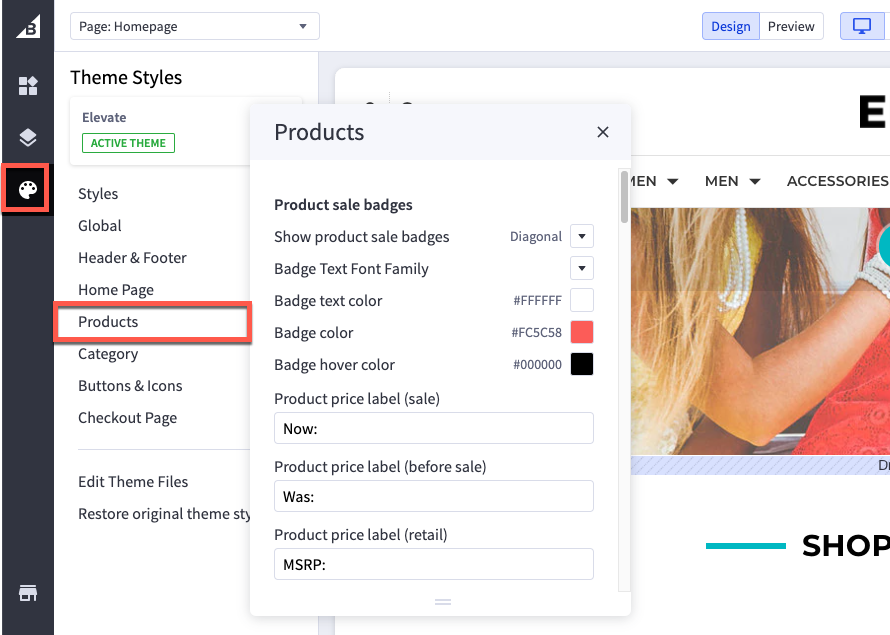
Product sale badges
| Show product sale badges | display style of the sale badge |
| Badge Text Font Family | set font family of sale badge |
| Badge Text color | color of the text in sale badge |
| Badge color | color of background of sale badge |
| Badge hover color | color of badge background when mouse cursor hovers over it |
| Product price label (sale) | set the label of the Sale Price text |
| Product price label (before sale) | set the label of Default Price text |
| Product price label (retail) | set the label of retail/MSRP price text |
| Product price label | set the label of of product price label when there is no sale price (like the “As low as” text) |
Product Page Settings
| Product Title Font Family | set the font family of the product title |
| Product Title Font Size | set the font size of the product title |
| Product Title Color | color of the product title |
| Product Description Color | color of the product description |
| Related Products Sub Heading | set the label for related products section |
| Customer Also Products Sub Heading | set the label for customers also purchased section |
Display Settings
| Show quickview button on product cards | toggle the quickview feature |
| Show wishlist button on product | toggle the wishlist button |
| Show compare button on product | toggle the compare button |
| Show quantity selection on product pages | toggle the quantity selector |
| Show product description tabs | product descriptions under a tabbed area or directly on the page |
| Product custom fields in tabs | toggle custom fields in tabs |
| Product custom fields tab label | set label for custom fields tab |
| Show product weight | display the product's entered shipping weight |
| Show product dimensions | display the shipping dimensions for the product |
| Show “Shop by price” in filters | show the shop by price feature |
| Wishlist dropdown background | color of the dropdown menu background when Add to Wish List is clicked |
| Number of reviews on product page | number of reviews displayed below the product description |
Number of products displayed
| Category page | number of products that appear on one page in a category |
| Brand page | number of products that appear on one page on a brand page |
| Search result page | number of products that appear on one page of search results |
| Product page (related products) | number of related products displayed below the product description |
| Product page (customers also viewed products) | number of Customers Also Viewed products displayed below the product description |
Product Cards
| Product header text color | color of the product’s title when viewed on the home page, category page, or search result |
| Product header text hover color | color of the product's title when you hover a cursor over it |
| Button text color | text color of the buttons, such as Add to Cart or Quick View, that appear when you hover over the product image |
| Button text hover color | text color of the buttons when mouse cursor hovers over them |
| Button background | background color of the buttons, such as Add to Cart or Quick View, that appear when you hover over the product image |
| Button Hover Background | background color of buttons when mouse cusror hovers over them |
| Button Border | color of borders on buttons |
| Button Hover Border | color of borders when mouse cursor hovers over buttons |
| Show Rating on Product | toggles rating on product |
| Show Brandon Product | toggle brand displayed on product |
Product cards (quick search)
| Text Color | color of text on product cards in quick search drop down |
| Text Hover Color | color of text on product cards in quick search when mouse cursor hovers over them |
| Background color | color behind the text with the product’s title and price |
| Border color | color of the border around the product |
| Product Card Price Font Family | set font family of the product card in quick search drop down |
Image Sizes
| Main product images | This is the size of the main product image on a product’s page. See our article on Adjusting Store Image Sizes for more information on adjusting product image sizes. |
| Thumbnail image in product page | size of the thumbnail images that appear in the product page |
| Thumbnail image in cart and other pages | size of the thumbnail images in cart and other pages |
| Zoomed image | size of the zoomed image on product page |
| Image in gallery view | size of product images when they appear on the category page, brand page, or search results |
| Brand image in gallery view | size of the brand image when viewed on the brands page |
| Show Card Swatch | toggle visibility of the swatches being displayed on the category level and cards of products |
| Product swatch images | size for swatch options images |