After purchasing the theme, Elevate will show up in the "My Themes" section of your BigCommerce account
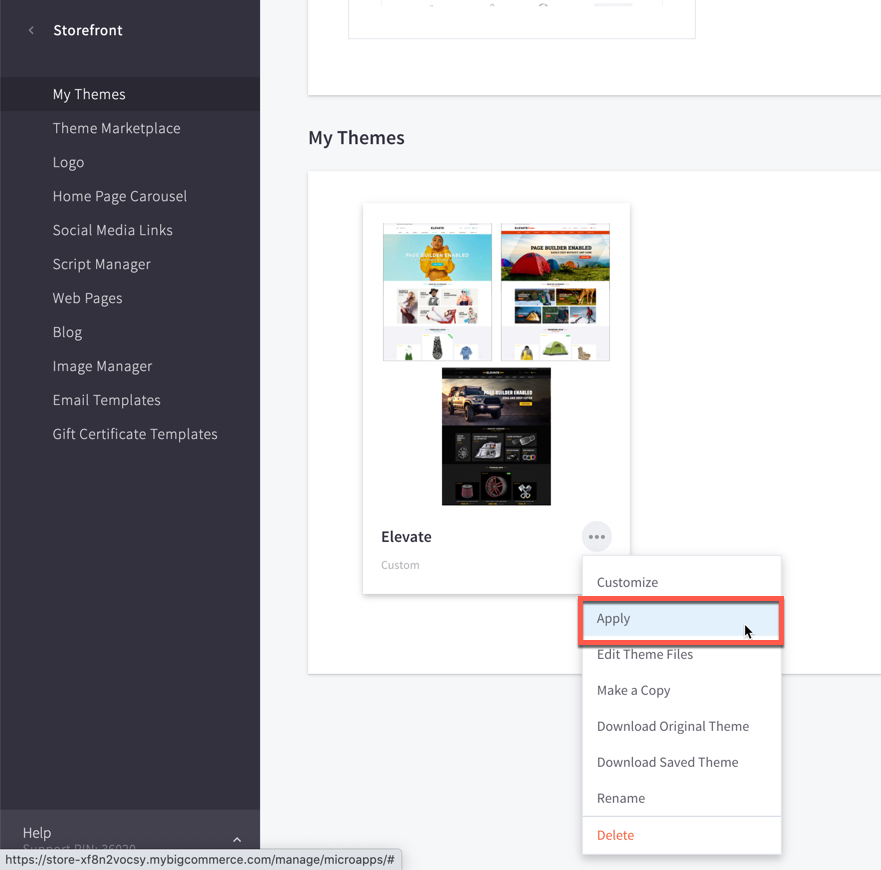
- Login to your Bigcommerce store’s admin page.
- Go to Storefront > My Themes.
- If the theme is not already present in your account, (otherwise skip to step 6) and you have the Theme Zip File, Click the Upload Theme button. On popup, please click the Select theme from your computer.
- Choose the zip file Elevate - x.x.x.zip from your computer to start installing the theme.
- Wait to complete the upload.
- After the uploading process, the new theme appears. Click on the Apply button as shown below.
- Choose the theme variation to apple: Fashion, Autoparts or Outdoors
- Refresh your store's home page and you will see the installed theme.